Cisco Identity Services Engine (ISE) version 3.3


Simplified Operations


New Split Update: Upgrading Cisco ISE has never been easier. With the new Split Upgrade feature, customers now have complete control over the upgrade process from the UI, allowing them to upgrade specific ISE nodes in parallel, with multiple iterations, at their convenience without experiencing any downtime. Say goodbye to complex and time-consuming upgrades.


Control Application Restart: Minimize Downtime, Maximize Efficiency. Downtime during certification renewals can be disruptive. Cisco ISE 3.3 introduces Controlled Application Restart, which allows customers to plan the renewals of the ISE administrative certificate, eliminating the need to reboot the entire ISE deployment at once without control. Schedule updates during low network usage periods, ensuring a smoother security update process without impacting operations.


Navigation improvement: ISE admins use the ISE UI in order to perform their job. ISE 3.3 introduces a new and improved navigation, allowing ISE admin to faster perform their tasks, with fewer clicks and without hiding their screen while navigating throughout ISE pages. Each ISE admin can now save the pages he or she is using most frequently on ISE and reduce the time it takes them to access those pages. 


IPv6 Support: in addition to the RADIUS, TACACS+, and ISE management over IPv6, customers can now enable additional services over IPv6: the ISE guest portal can now be accessed over IPv6 address and serve guests on the IPv6 network. profiling of IPv6-enabled endpoints and doing posture checks is also available for IPv6-enabled endpoints. 


Enhanced Platform Security


TPM Chip: Strengthen Security with the TPM Chip Security is paramount. Cisco ISE 3.3 with SNS-3700 (or virtual machines supporting VTPM) introduces the TPM Chip, a dedicated and secure storage location for sensitive information. With true random number generation for key generation, the TPM Chip enhances the security of stored data, providing you with peace of mind.

ISE Cipher Control: By allowing ISE admins to disable unwanted and weak ciphers manually, ISE 3.3 helps customers to meet compliance and regulations without the need to wait for the next release or a patch. 


TLS 1.3 for ISE admins: ISE admins can now connect to ISE UI over TLS 1.3. TLS 1.3 provides enhanced security and improved performance by reducing latency and eliminating outdated cryptographic algorithms, ensuring stronger encryption and more efficient communication between clients and servers. 

Certificate-Based Authentication for API calls: ISE 3.3 supports Certificate-based authentication for API calls. Certificate-based authentication offers stronger security by eliminating the vulnerabilities associated with traditional username and password authentication methods. It provides robust protection against credential theft, unauthorized access, and phishing attacks, ensuring a higher level of trust and authentication for users accessing sensitive systems or resources.


Visibility and Compliance


AI/ML based Profiling: Effortlessly Identify Unknown Endpoints with AI/ML Profiling Unidentified endpoints on the network can be a challenge. Cisco ISE 3.3 employs AI/ML Profiling and multi-factor classification (MFC) to swiftly identify clusters of similar unknown endpoints. This cloud-based ML engine helps customers categorize these devices accurately, making it easier to determine their nature and apply appropriate policies.


Unlock Valuable Insights with Wi-Fi Edge Analytics 

Our exclusive Wi-Fi Edge Analytics feature enables customers, who use the Cisco Catalyst 9800 wireless controllers, to exchange data between ISE 3.3 and the controller and get profiling information from Apple, Intel, and Samsung devices, enhancing endpoint profiling. 

This information includes endpoint-specific attributes such as model, operating system version, and firmware. 


Multi Factor Classification: ISE 3.3 introduces a new way to profile endpoints on the network. The profile is no longer a descriptive string of the endpoint. Instead of that ISE uses MFC – Multi Factor Classification which breaks the profile into 4 categories: Manufacturer, Device Type, Model and OS. This allows our customers to build more granular policies, based on the different MFCs. 


Posture for ARM based Windows: for customers who move to computers based on ARM processor, ISE 3.3 can now perform posture checks in order to check compliance status before letting those endpoints access to the network. 


Cloud Availability 


ISE 3.3 is going to be available on all the supported platforms: AWS, Azure, and Oracle Cloud. Release dates depend on the different cloud vendors:

ISE 3.3 on Azure  – Already available

ISE 3.3 on OCI – Already Available

ISE 3.3 on AWS – Already Available


ISE 3.3 Resources:
 

ISE 3.3 download page

ISE 3.3 release notes

Upgrade to ISE 3.1 on AWS

Below is the prep work for migrating from ISE2.4 to ISE3.1+ for AWS, and the migration steps are here, but I have summarize them below.

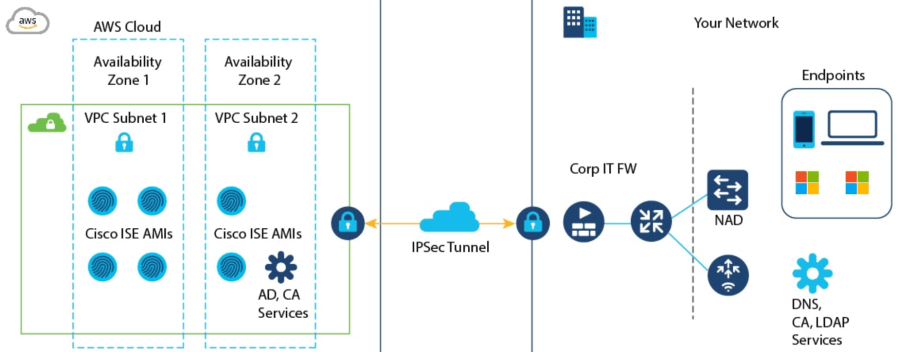
Cisco ISE is available as an infrastructure-as-code solution leveraging AWS CloudFormation making the deployment of ISE a very light lift. I’ll be walking you through how to deploy ISE on AWS in a later post.

Step 1 – Base, Plus, Apex, and Device Admin licenses need to be migrated to Smart Licenses
Step 2 – VM licenses need to be converted
Step 3 – Migration can occur. Once licenses are prepped and converted, you go to the AWS Marketplace ISE BYOL listing and choose your deployment size. 

ISE Licensing

  1. AWS ISE requires ISE 3.1+
    1. If upgrading to 3.1 from an existing 2.X release, it is required that a customer migrate their existing licenses to the new licenses and then upgrade to the 3.0 release. I.e. These are the Base, Plus, and Apex license that need to be upgraded. Device Admin licenses are grandfathered and need to be upgraded to a Smart License as well.
  2. This requires a Cisco Smart License Account. 
  3. Please refer to the Migration Guide for instructions.

ISE VM – You need to register the VM Common license for ISE 3.1 and later.

  1. Customers need to migrate their ISE License to the new “Common License.”
    1. To migrate the legacy VM license to the VM Common license, customers need to obtain the $0 upgrade Product ID (PID), “L-ISE-VMC-UPG=, from Cisco. This is the same PID regardless of what current size of VM license you have today.
    2. https://www.cisco.com/c/en/us/products/collateral/security/identity-services-engine/ise-licensing-migration-guide-og.html

2. To obtain a VM Common License for a net new deployment you’ll need the new VM PID, “R-ISE-VMC-K9=” Refer to the table below for a 1:1 mapping.

These VM licenses are valid in Cisco ISE 3.0 and earlier releases. Again, when you upgrade your Cisco ISE to Release 3.1, you will need to have VM Common license.  

Upgrade FromUpgrade ToRatio
R-ISE-VML-K9=R-ISE-VMC-K9=1:1
R-ISE-VMM-K9=R-ISE-VMC-K9=1:1
R-ISE-VMS-K9=R-ISE-VMC-K9=1:1

How to migrate license

To migrate the legacy VM license to the VM Common license, customers need to obtain the $0 upgrade PID, “L-ISE-VMC-UPG=,” in CCW. See ISE Licensing Migration Guide for the detailed process.

Support for VM and License

Q. What support do customers receive with the new ISE licenses?

A. The same as with current subscription licenses. With the new ISE software licenses, customers receive embedded SWSS—which covers 24x7x365 Cisco Technical Assistance Center (TAC) support and software updates. However, now Essentials will also have this support.

More Question and Answers here

Support associated with the legacy VM licenses

When customers upgrade the version of their legacy VM to VM Common license, they can continue to receive support based on the support contract purchased on legacy VM license PID. They can renew the support until the legacy VM license PID is EOL and reaches the last service renewal date per the EOL bulletin. There is no support for migration. For seamless support, the customer should request the legacy VM PID to be replaced with the desired VM PID in order to renew and receive support.

Mike

EoS and EoL roll-up for Cisco AirOS Wireless, ASA, and Switching

End of Sale and End of Life dates for AireOS Cisco Wireless LAN Controllers – AIR-CT-3504AIR-CT-5520AIR-CT8540AIR-CTVM 


End of Sale and End of Life dates for ASA 5506, 5512 & 5515, 5508 & 5516, 5525, 5545 & 5555, 5585-X, 5585-X FP

End of Sale and End of Life dates for Cisco Catalyst – 2960X/XR2960L/P3650SUP9E

Mike

Protecting the WFH workforce – Defending against COVID-19 malicious domains

Many organizations have implemented work from home (WFH) strategies due to COVID-19. This measure, although enabling business continuity for many, introduces increased risk to cyber threats and attacks.

Cisco Talos has been proactively hunting COVID related outbreaks, educating the public, and pushing these discoveries to all Cisco Security tools for blocking. I encourage you to read the Talos blog, “Threat Actors attempt to capitalize on coronavirus outbreak” and “Threat Update: COVID-19“.

Talos goes as far as to list ways that you can defend against COVID related attacks. Cisco Umbrella, in particular, can leverage threat intelligence from Cisco Talos, to uncover and block these malicious domains, IPs, URLs, and files that are used in attacks. It’s not just Talos intelligence that Umbrella can leverage, however. You can take advantage of 3rd party threat intelligence platforms (TIP) that you may have and create a completely robust, kickass defense for your work from home workforce.

Here’s how –

Turn on – Newly Seen DomainsAs part of Cisco Umbrella intelligence, some domains may be blocked as Newly Seen Domains (NSD). Newly created domains related to COVID-19 will also be flagged as NSD as long as they fit the criteria.

Third Party Integration: Umbrella support integrations with SIEM, threat intelligence platforms, or homegrown systems. This feature utilizes the ‘Enforcement API‘ in Umbrella.

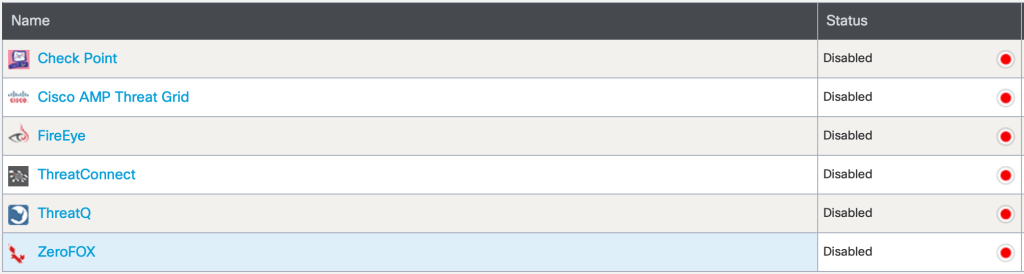
Here are the default integrations.

In this case, I want to show you how to leverage a homegrown system. We’ll call it “COVID-19-BLOCK”

When you add a new integration, an API key is generated. This API key can be used to make requests to and from Umbrella.

Our homegrown system is nothing more than a simple python script that makes POST requests to Umbrella.

# Custom integration - ADD EVENT URL
import requests

url = "https://s-platform.api.opendns.com/1.0/events?customerKey=c988727a-XXX-XXXX-XXXX-XXXXXXXXX";

payload = "{\n    \"alertTime\": \"2013-02-08T11:14:26.0Z\",\n    \"deviceId\": \"ba6a59f4-e692-4724-ba36-c28132c761de\",\n    \"deviceVersion\": \"13.7a\",\n    \"dstDomain\": \"coronadiseasenews.com\",\n    \"dstUrl\": \"http://coronadiseasenews.com/a-bad-url\",\n    \"eventTime\": \"2020-03-31T09:30:26.0Z\",\n    \"protocolVersion\": \"1.0a\",\n    \"providerName\": \"Security Platform\"\n}"
headers = {
  'Content-Type': 'application/json'
}
response = requests.request("POST", url, headers=headers, data = payload)

print(response.text.encode('utf8'))

After running the script, we can confirm that our request to block the COVID-19 malicious domain was successful.

As you can see, we were successful in adding this malicious domain to our block list.

Now, take a moment to expand on this custom integration that we just made. There are roughly 70,000 COVID-19 malicious domains and growing daily. What if we were able to take all of the published COVID-19 molicous domains and add them to an Umbrella block policy like we did above?

I think that would make any CSO smile.

Mike

DUO MFA

The Challenge and the Solution

Modern enterprises demand agility. Mobile workforce and bring your own device (BYOD) trend has sparked a digital transformation. Organizations have to deal with a diverse set of users such as employees, contractors and partners who work from anywhere at anytime and on any device. The proliferation of user types, devices and access locations increases security risks for the organizations. 

It’s no longer safe to assume that users are who they say they are and their devices are secure. 

Duo’s focus is on securing access for any user connecting to any application from any device.  The new network perimeter is wherever an access decision happens. Duo protects this new perimeter by verifying user trust (confirming a user is who they say they are) using its best-in-class adaptive multi-factor authentication (MFA) solution.

As a result, Duo integrates with any application with ease, provides self-enrollment and an excellent end-user experience.

AnyConnect with DUO

Where’s the proof?
Options Technology
Facebook

WANT TO TRY IT?
Demo DUO

Need to know more? https://duo.com

Mike

Secure Internet Gateway – Cisco Umbrella

As traffic patters change to a decentralized pattern, there needs to be a way to secure traffic to the cloud.

Today we will be talking about the Secure Internet Gateway (SIG), Umbrella formally OpenDNS.

Umbrella is a recursive DNS service, it resolves DNS queries. Almost everything starts out by making a DNS request.

The process of recursive DNS look-ups are pretty straightforward. Lets walk the process.

  1. A user opens web browser and types in Amazon.com
  2. Umbrella, the recursive DNS services queries a root server. The root server only has top level domain IPs for top level domain servers. Eg. (.com, .net). The root server will reply to Umbrella “I’m not sure, but here is the IP for the .com server, ask them”
  3. Umbrella queries the TLD server (.com). The TLD server stores information on the Authoritative Name Servers for domains that end in (.com). The TLD server will reply to Umbrella “I’m not sure, but here is the IP for the Authoritative Name server, ask them”
  4. Umbrella now has the IP address of the Authoritative Name Server for Amazon.com, Umbrella will ask Amazon’s Authoritative Name Server, what is your IP address of your Amazon web site.
  5. Amazon will reply with the IP of their website. Umbrella will return the web page to your browser.Screen Shot 2018-10-08 at 11.28.00 AM

There are three scenarios when resolving DNS with Umbrella.

  • Safe – Determined as a safe DNS request. Returns IP-to-URL mapping.
  • Block – Determined as unsafe/malicious DNS request and your request is blocked. The request is blocked by a block page. A block page is configured by an administrator.
  • Inspect – Determined as a risky DNS request. Sites like peer-2-peer hosting could be considered risky. In this scenario Umbrella returns the IP address of the Umbrella proxy so that the site can be inspected.

The Inspect scenario is where Umbrella gets interesting. Proxys are now involved in the scenario. Instead of just seeing the top level domain of a URL, the proxies now inspect the entire URL and web content. It leverages AV definitions, AMP and Talos to determine the sites reputation and content.

How does Umbrella determine a site to be malicious vs non-molicous?

This recursive process is processed by algorithms known as “models” that monitors request patterns,  malicious traffic, and abnormal behavior. The output from multiple models is how a domain is determined malicious or non malicious.

Some of these models:

  • Co-Occurance model
  • Spike Rank Model
  • Predictive IP space monitoring

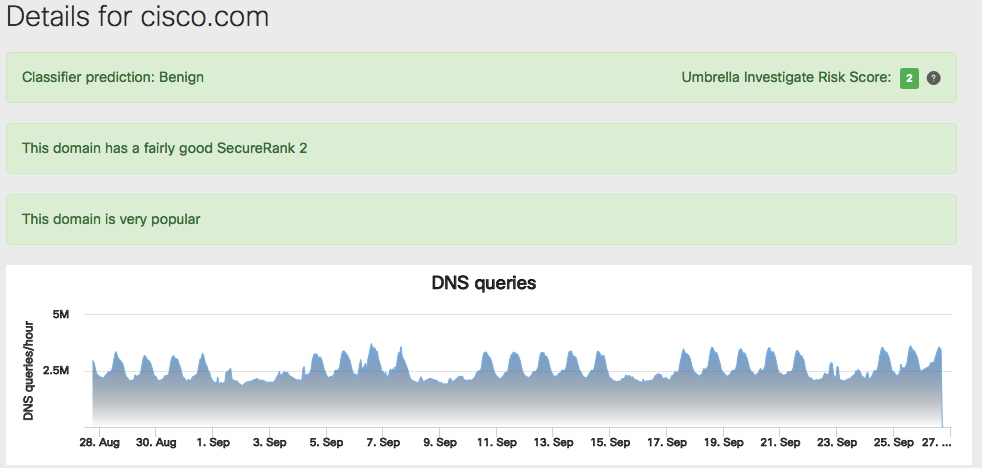
Umbrella Investigate is a built in capability that can give you some offensive tools when responding to security incidences.

Screen Shot 2018-09-26 at 3.00.41 PM

Investigate provides real time intelligence on domains and IPs across the Internet to help uncover anomalies and pinpoint malicious domains/IPs. Access to the intelligence is done through web console or api for you to integrate your current security infrastructure with Investigate.

Screen Shot 2018-09-26 at 3.12.20 PM

How do you use Umbrella?

Simply point your DNS to the Umbrella DNS servers. You can do this in several ways.

  • DHCP
  • The ISR 4K version 16.6.1, any traffic passing through the router will use Umbrella
  • Generate an API key through the Meraki Dashboard, integrate it into the Meraki MR
  • Out of the box integration with  Viptal vEdge
  • Cisco Any Connect (Roaming Devices)
    • AnyConnect Umbrella Roaming module
    • If not using AnyConnect, install standalone roaming client

If your clients are using the AnyConnect Umbrella module, the DNS is intercepted by the kernal driver that is sitting at the network adapter. This is the same process that AnyConnect uses when using VPN.

Screen Shot 2018-09-26 at 3.41.16 PM

If your clients are using the roaming client, all DNS requests from any running application are pointed to 127.0.0.1 and then handled by the roaming client.

Where are the Umbrella DNS servers located?

The Umbrella Data Centers are Co-Located at Major IXPs, this enables best path selections throughout the Internet via BGP. Anycast routing  is used for reliability to the DNS resolvers with no additional latency. Anycast routing improves functionality by sending your traffic to the closest data center and provides redundancy.

You can view the location of the Data Centers and the status of Cisco Umbrella systems through this link.

Data Center Locations

For more information see the documentation page Umbrella Documentation

Mike