Modern enterprises demand agility. Mobile workforce and bring your own device (BYOD) trend has sparked a digital transformation. Organizations have to deal with a diverse set of users such as employees, contractors and partners who work from anywhere at anytime and on any device. The proliferation of user types, devices and access locations increases security risks for the organizations.
It’s no longer safe to assume that users are who they say they are and their devices are secure.
Duo’s focus is on securing access for any user connecting to any application from any device. The new network perimeter is wherever an access decision happens. Duo protects this new perimeter by verifying user trust (confirming a user is who they say they are) using its best-in-class adaptive multi-factor authentication (MFA) solution.
As a result, Duo integrates with any application with ease, provides self-enrollment and an excellent end-user experience.
I have officially set a date for my CCIE lab. April 12th 2019, in Richardson TX! This date changed from my original thought of sometime in February. There were still a lot of tasks that I wanted to complete before sitting for the lab so this made sense. I have a jam packed study schedule right up until the last 6 days before the test.
I’m using Cisco 360 as new study material. Every Wednesday is Troubleshooting. Each section below is to be completed in a 10-14 day stint.
IT is constantly being asked to deliver value on infrastructure, reduce operational cost, and meet application demand all with a constrained budget. Legacy infrastructure doesn’t keep pace with the agile operations of development teams or their applications. The threat of the infrastructure shifting to a pure Cloud model is on every CXO mind.
It’s time for a new infrastructure, one that doesn’t require a large upfront capital expense, avoids vendor lock-in and keeps pace with modern business. This is what Hyperconverged infrastructure solves.
So what is Hyperconverged infrastructure?
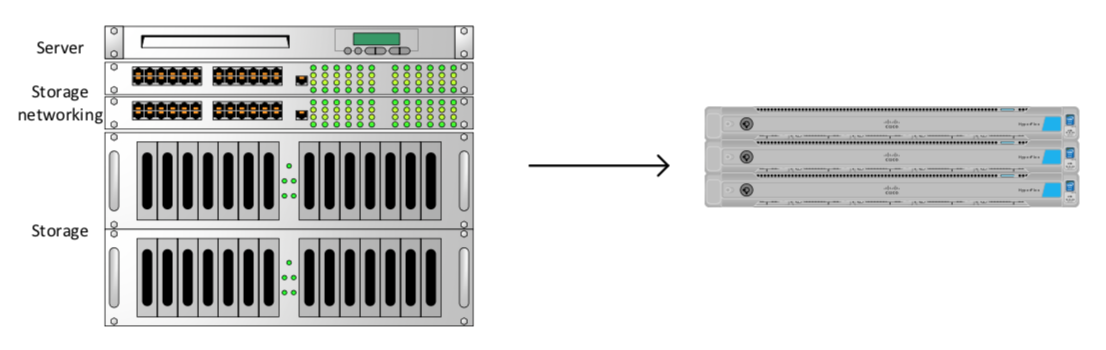
Hyperconverged infrastructure integrates storage, compute, storage networking and virtualization into one solution while providing a single point of management and the flexibility to scale on-demand. It aims to replace expensive legacy datacenter infrastructure.
Cisco HyperFlex Solution
Cisco HyperFlex is a complete HCI solution. HX leverages intelligent software to combine datacenter hardware using locally attached storage (SSDs or HDD). Each server also known as a node is powered by an Intel-x86 chip. The HX software runs on each node and “clusters” operating resources to enable a distributed architecture.
A small virtual machine known as the data platform controller sits and runs on every node in the cluster. The CDP is responsible for unifying the data plane and the management plane for the cluster. The CDP is key to the distributed architecture mentioned above.
Several HX hardware platforms are available for varying workloads.
The adoption of Cloud computing has accelerated innovation. The 3-5 year guess work and cost that goes into infrastructure sizing is no longer a thing. We simple innovate too fast. Reduce your upfront cost and guess work by investing in HX, replace legacy infrastructure and keep pace with innovation.
Scalability
Avoid the fork-lift approach, adopt the lift-n-shift approach. Future planning with HX will allow you to transition to a hybrid-cloud infrastructure when the time is right. You will be thanking yourself later. This avoids the fork-lift approach associated with legacy infrastructure when you need to expand storage or replace it all together.
In summary, if you are not adopting a pure Cloud infrastructure you need to be adopting HCI to close the gap between traditional networks and the Cloud. As a biproduct, you will reduce cost, keep pace with innovation, and meet the demands of modern business.
I’m sitting to write this after several hours of lab time..
Around a month ago, I started INEs foundational labs. First one I did great, took me about 3.5 hours from start to finish.
The following week I started Foundation Lab 2. That took me about 25 hours to complete. I got stuck on a redistribution issue and wouldn’t allow myself to move on from it until I understood what was going on and how to properly diagnose and fix it.
The week after that I started Foundation lab 3. Foundation lab 3 took me 22 hours. I did both Foundation Lab2/3 over a course of a couple of day and performed code review afterwards. Redistribution was an issue in Foundation Lab 3 but wasn’t nearly as much of an issue for me as in Lab 2.
I still wasn’t happy with how much stumbling I did in both labs but I decided to try Troubleshooting Lab 1. I got my chin checked so hard! I got to ticket 5 and gave up. It was odd, I understood what the questions were asking but I sat almost paralyzed in thoughts… I spiraled for a bit in my own sauce for a week trying to figure out what I need to be doing to get to being, Troubleshooting Lab ready. I decided to go back to the Advanced Technology labs and get terminal time. This is what I am doing day in and day out. I’m trying to randomize things though. For instance ill spend an hour in multicast, jump to OSPF, go to IOS security for an hour. Then I’ll come back the next day and jump back into multicast from where I left off last, hit BGP, etc… Just trying to get my recall and enforcement up.
I met a fellow Cisconian going through the grind as well. It felt great being able to relate with someone. We shared our struggles and strategies and I’m hoping to link up with them soon to do labs and maintain our ambition.
Its an unreal, humbling and emotional experience going through this journey. I’ve never had to endure something so mentally challenging in my life. LET’S GET BUSY!!
“Start by doing what’s necessary, then do what’s possible, and suddenly you are doing something impossible” – Saint Francis of Assisi
I get the question a lot. What is a fabric? Most have an idea of what it is, but its a blurry idea. Fabric is a word that is being thrown around by many. It can be intimidating to ask, what exactly is a fabric. So today our goal is to provide an overview to the question. What is a fabric? I define it in the first section but get into some of the components throughout the post.
A fabric is a two layer construct. There is an underlay which is your physical make up of the network. Responsible for moving the packet. The overlay is the abstract service layer, it is responsible for things such as policies, segmentation, and mobility. Some overlay technologies that you may be aware of: CAPWAP, GRE, MPLS, DMVPN, OTV, ACI, LISP.
Overlays can come in two ways:
Layer 2 Overlays – Offers single subnet mobility within layer 2, extending L2 flooding.
Layer 3 Overlays – Offers IP mobility, Transports IP packets, contains failure domains.
So the new term for a LAN enabled fabric is ‘campus fabric’. However, its commonly shortened and referred to as a fabric or a fabric domain.
The campus fabric can be summarized as having
LISP based Control-Pane
VXLAN based Data-Plane
Integrated Cisco TrustSec (policy plane)
Let’s pause to define some terms within the Campus Fabric. Don’t glaze over on me! Just be aware of these terms, no need to know them inside and out for this overview.
Control-Plane Node = LISP Map-Server : is a node in the fabric responsible for resolving EIDs to RLOCs Edge Node = LISP Tunnel Router (xTR) : responsible for encapsulating the packet at the edge of the network and authenticating endpoints. Border Node = LISP Proxy Tunnel Router (PxTR) : responsible for de-encapsulating the packet or encapsulating the packet when entering or leaving the fabric. Any traffic entering or leaving the fabric goes through this node. You NEED at least one of these. Intermediate Node = Non-LISP IP forwarder : Imagine a 3-tier architecture; Access-Distro-Core, the Distro would be your intermediate nodes. Fabric Domain = FD = LISP Process Virtual Network = VN = LISP Instance = VRF : Maintains a separate Routing and switching instance for each virtual network Endpoint ID Group = EIG = Segment = SGT : Each user of device is assigned to a unique Endpoint ID Group Host Pool = Dynamic EID = VLAN + IP Subnet : Provides the basic IP constructs including Anycast Gateway.
LISP overview
Locator ID Separation Protocol – Now read that back sloooowly.. It’s self defining. LISP is separating IP(ID) from location(Locator).
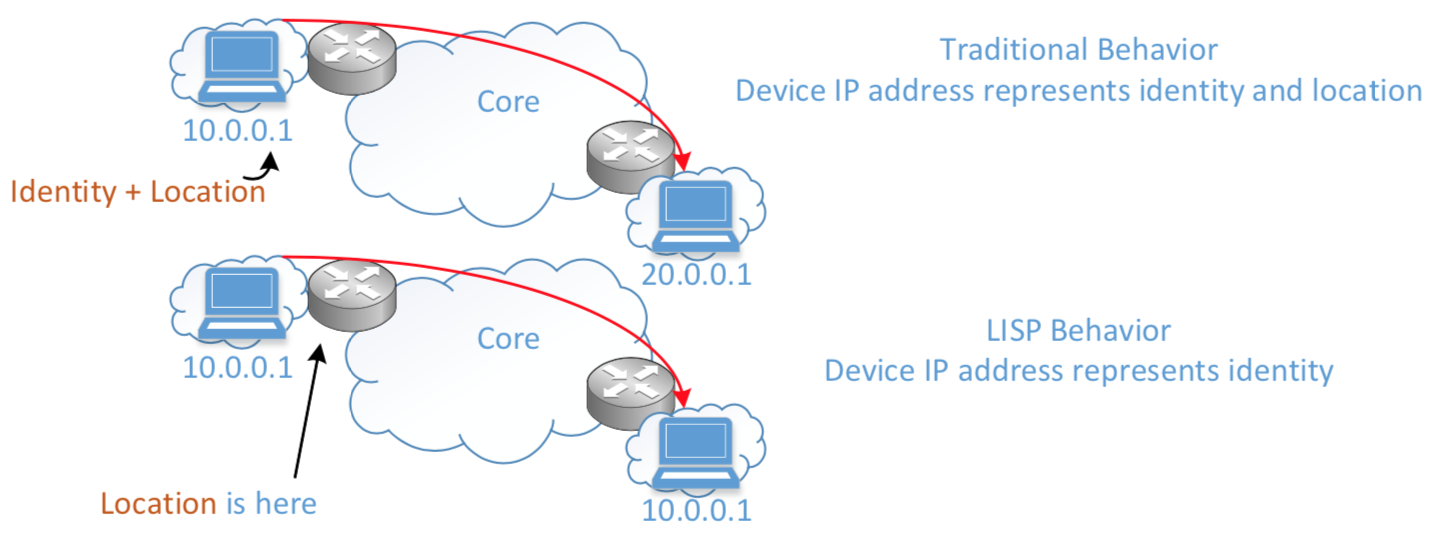
LISP at it’s simplest form is nothing more than a mapping system but is a routing architecture, a control plane protocol and a data plane protocol. It separates Identity from a Location.
A devices IP (identity) is generally associated to a location of that device. If a device wants to roam to a new location the device needs a new IP (identity) for that location.
From a design perspective you can see how this can be helpful. This is just like when you roam between cell towers with your cell phone. Your location changes but your cell phone number (identity) does not.
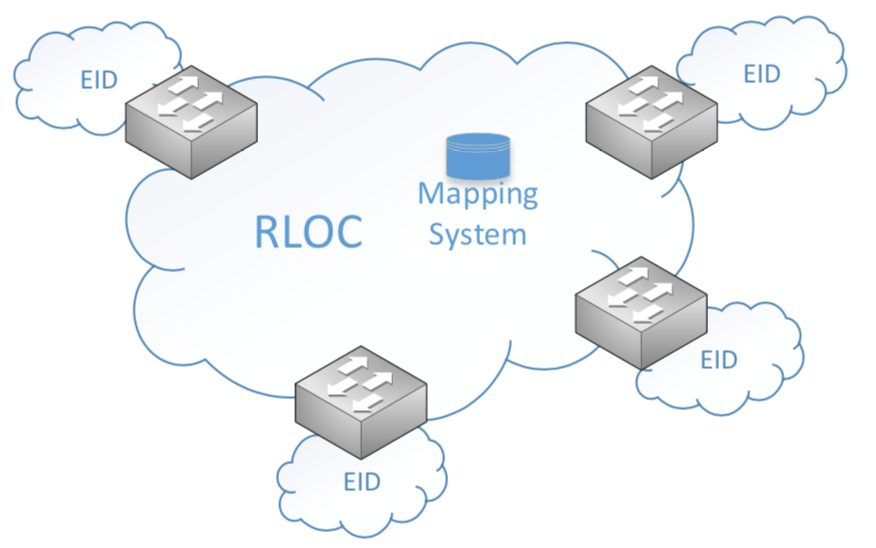
LISP will assign End-point Identifiers or EID to hosts and will take on the role of acting as the devices identity. I don’t want to confuse you, EIDs do not replace a devices IP. EIDs are there to help RLOC map a device to a location.
Routing locators or RLOCs map End-point Identifiers (EID) to a current location. The control plane node is responsible for doing this. RLOCs should be viewed as the Control plane protocol for LISP.
LISP mapping system can be analogous to a DNS resolution where DNS queries answer the “WHO IS” question and LISP resolution answered the “WHERE IS” question.
Why do I care about LISP? Because the fabric overlay is LISP enabled!
VXLAN Data-Plane Overview
VXLAN Encapsulation is used to carry L2 information. This is necessary because if we were to run LISP only, we would not be able to carry L2 information. LISP payload only supports L3 information. So, to achieve L2 and L3 capabilities, we run VXLAN.
What is Cisco TrustSec?
TrustSec (CTS) takes the complexity away from the static ACL and uses a tag based mechanism. So instead of creating enforcement on an IP you create enforcement around a tag which allows for mobility.
Lets wrap things up with a list of platforms that support campus fabric.
Fabric Edge Nodes
Catalyst 9300 – IOS-XE 16.6.3+
Catalyst 9400 – IOS-XE 16.6.3+
Catalyst 3K – IOS-XE 16.6.3+
Catalyst 4500 Sup8E+ – IOS-XE 3.9+
Fabric Border Nodes
Catalyst 9500 – IOS-XE 16.6.3+
Catalyst 3K
Catalyst 6800 Sup2T/6T – IOS 15.4SY+
ASR-1000-X/HX – IOS-XE 16.4+
ISR4K – IOS-XE 16.4+
Nexus 7700 w/ M3 cards – NX-OS 7.3.2+
Fabric Control Plane
Catalyst 9500
Catalyst 3K
Catalyst 6800 Sup2T/6T
ASR-1000-X/HX
ISR4K
Lab it up! You only need three switches to test this out.
You can use the command ‘fabric auto’ which will automatically generate the necessary LISP and VXLAN configurations on the device so that the device can join the fabric.
As traffic patters change to a decentralized pattern, there needs to be a way to secure traffic to the cloud.
Today we will be talking about the Secure Internet Gateway (SIG), Umbrella formally OpenDNS.
Umbrella is a recursive DNS service, it resolves DNS queries. Almost everything starts out by making a DNS request.
The process of recursive DNS look-ups are pretty straightforward. Lets walk the process.
A user opens web browser and types in Amazon.com
Umbrella, the recursive DNS services queries a root server. The root server only has top level domain IPs for top level domain servers. Eg. (.com, .net). The root server will reply to Umbrella “I’m not sure, but here is the IP for the .com server, ask them”
Umbrella queries the TLD server (.com). The TLD server stores information on the Authoritative Name Servers for domains that end in (.com). The TLD server will reply to Umbrella “I’m not sure, but here is the IP for the Authoritative Name server, ask them”
Umbrella now has the IP address of the Authoritative Name Server for Amazon.com, Umbrella will ask Amazon’s Authoritative Name Server, what is your IP address of your Amazon web site.
Amazon will reply with the IP of their website. Umbrella will return the web page to your browser.
There are three scenarios when resolving DNS with Umbrella.
Safe – Determined as a safe DNS request. Returns IP-to-URL mapping.
Block – Determined as unsafe/malicious DNS request and your request is blocked. The request is blocked by a block page. A block page is configured by an administrator.
Inspect – Determined as a risky DNS request. Sites like peer-2-peer hosting could be considered risky. In this scenario Umbrella returns the IP address of the Umbrella proxy so that the site can be inspected.
The Inspect scenario is where Umbrella gets interesting. Proxys are now involved in the scenario. Instead of just seeing the top level domain of a URL, the proxies now inspect the entire URL and web content. It leverages AV definitions, AMP and Talos to determine the sites reputation and content.
How does Umbrella determine a site to be malicious vs non-molicous?
This recursive process is processed by algorithms known as “models” that monitors request patterns, malicious traffic, and abnormal behavior. The output from multiple models is how a domain is determined malicious or non malicious.
Some of these models:
Co-Occurance model
Spike Rank Model
Predictive IP space monitoring
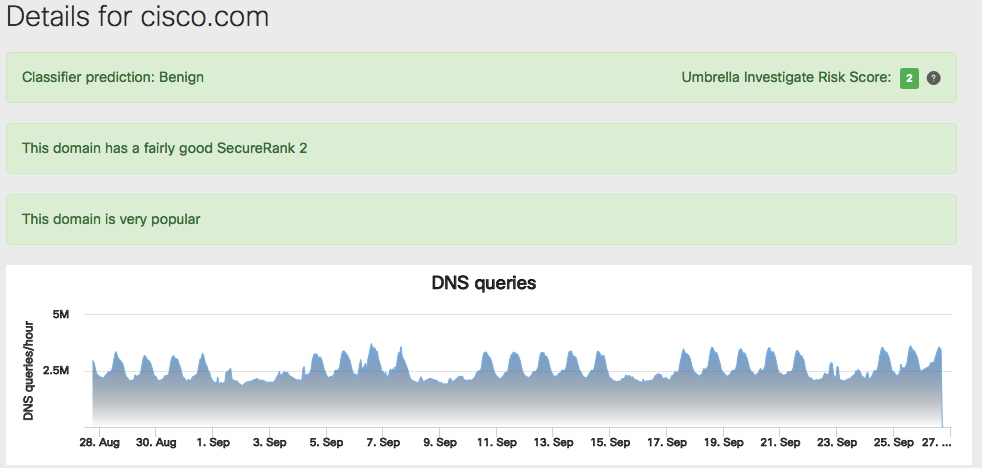
Umbrella Investigate is a built in capability that can give you some offensive tools when responding to security incidences.
Investigate provides real time intelligence on domains and IPs across the Internet to help uncover anomalies and pinpoint malicious domains/IPs. Access to the intelligence is done through web console or api for you to integrate your current security infrastructure with Investigate.
How do you use Umbrella?
Simply point your DNS to the Umbrella DNS servers. You can do this in several ways.
DHCP
The ISR 4K version 16.6.1, any traffic passing through the router will use Umbrella
Generate an API key through the Meraki Dashboard, integrate it into the Meraki MR
Out of the box integration with Viptal vEdge
Cisco Any Connect (Roaming Devices)
AnyConnect Umbrella Roaming module
If not using AnyConnect, install standalone roaming client
If your clients are using the AnyConnect Umbrella module, the DNS is intercepted by the kernal driver that is sitting at the network adapter. This is the same process that AnyConnect uses when using VPN.
If your clients are using the roaming client, all DNS requests from any running application are pointed to 127.0.0.1 and then handled by the roaming client.
Where are the Umbrella DNS servers located?
The Umbrella Data Centers are Co-Located at Major IXPs, this enables best path selections throughout the Internet via BGP. Anycast routing is used for reliability to the DNS resolvers with no additional latency. Anycast routing improves functionality by sending your traffic to the closest data center and provides redundancy.
You can view the location of the Data Centers and the status of Cisco Umbrella systems through this link.






 Apronets