CCIE journey update part 6

June 7, 2019, was the date I chose for my second attempt at the CCIE lab.

My first attempt at the lab was April 12, 2019. It took me about a week to decide on when my next attempt was going to be. I reflected on my first attempt and came out learning several vital things.

1. I did a poor job confirming what pre-configurations there may have been in the configuration section.

For example, there could have been BGP configurations already preconfigured in my topology. I should have checked, reviewed what was there, and worked off of what was there

2. I linearly configured the topology.

My tracking strategy was vital, though I set a trap for myself. When working through the configuration section, each task I configured one after the other. What I mean by this is, if I started and complete section 1.0, my next part was 2.0. Configuring my topology in this manner set me up for failer. I needed a more strategic way to configure.

3. I worried too much.

Each completion of a section I worried that it was wrong. Even if I knew it was a surefire answer, I still worried I got it wrong. It’s like sitting for a math test where you are allowed to use your calculator, and you perform 3×3 on the calculator to triple-check that your brain knew how to multiply.

I purposely committed to a follow-up testing date that allowed me to maintain momentum but still able to work on my shortfalls.

At this point, I knew what I needed to do and got tactical about it. I put another 100 + hours into my studies before sitting on June 7. I got faster at configuring my full-scale labs by grouping configuration together. An example of this is if my lab called for a mpBGP core with OSPF as the IGP. I set up both protocols before moving to another task. That sounds simple, but it took practice to read ahead and recognize that there was a requirement for both. I started to do this “grouping” for everything I was asked to configure.

My studies stopped two days before taking off for my second trip to Richardson, Texas. I took down my business card from the cork wall at the gym and was bringing my good luck charm, my wife.

Test day

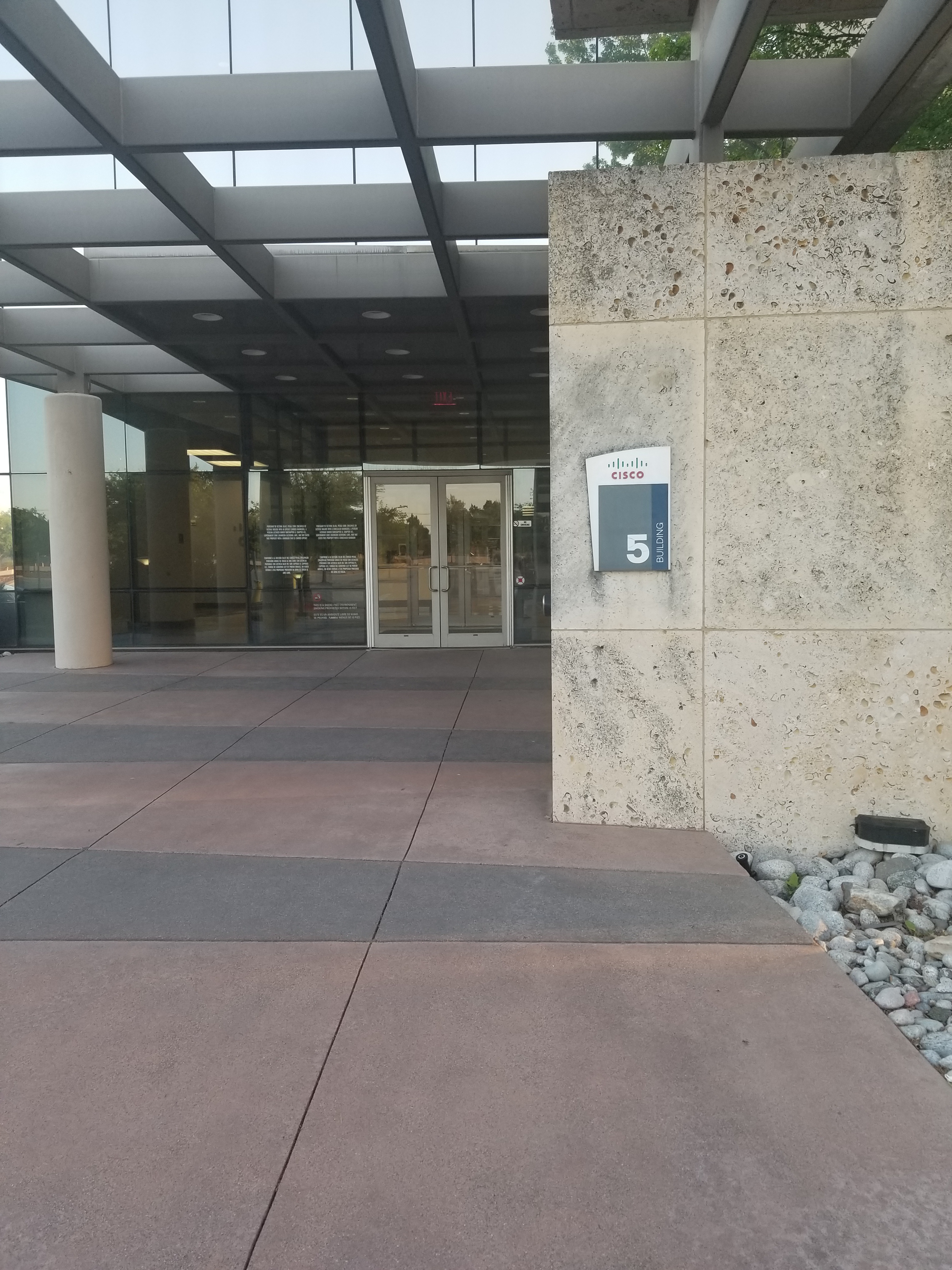
I was a lot less nervous this time around. My wife dropped me off at Cisco building 5, and it was game on.

I checked in with the receptionist and chose my lunch, knowing that I wasn’t planning on eating it. I was the first to enter the testing room, where I got assigned the lab station one to the left of where I sat on my first attempt. I waited anxiously for the other candidates to take their seats at their assigned lab stations.

It’s go time! I executed the same strategy for Tshoot as it had worked for me the first time around. After two hours, I tallied up my points and was undetermined if I had enough to move on. I had one ticket that could have gone both ways based on the restrictions outlined in the scenario and what my results were. I ultimately decided to move on because I didn’t have any more to give that section and didn’t want to eat up valuable time in the configuration section.

The Diag section was a bit more complicated than my first attempt. I ended with five minutes to spare and took my chance to use the bathroom.

I hit “phase 3,” the configuration section. I reviewed the entire test. This time around, I decided not to draw an L2 diagram. Instead, I relied solely on CDP, the topologies provided, and I double-checked my work before moving on from the L1/L2 section.

Lunch came quick, and I had completed L1/L2 connectivity, achieved same subnet reachability, I had started on some L3 in the core of my network and picked away at some low hanging fruit. I was feeling good. I saved my configurations before getting up and had left for lunch with knowing what I wanted to come back to next.

I took a couple of sips of my soft drink (Sprite) and waited for the others to finish their lunch. I would recommend getting something with some sugar in it at your lunch as this helped get me through the afternoon.

I came back to configuring my topology, where I faced some real challenges. I took them in stride and broke them down fairly quickly.

It was around 3 PM that I finished my last configuration task. I used the remainder of my time reviewing everything line-by-line. I found around ten points that I would have missed if I hadn’t had the time to review. I saved the running configuration on each device and left their terminal screens at the default prompt.

I left the testing center, knowing that I had a chance at passing. I shared my day with my wife over dinner and expected that I would know my results by the next morning. Saturday morning came and went, and I had no results. I woke Sunday to no results. Sunday night into Monday morning, I lied awake with anticipation of my test results.

Monday at 2:32 AM, I receive my email. I logged in to see that I had passed! I was awarded a CCIE #62183. I woke up my wife to share with her the news. She was more excited than I was!

There are a couple of things I wish I had done differently after reflecting on it.

  1. The EVE-NG platform looks to be more robust than GNS3. I wish I had invested some time to understand the platform.
  2. I shouldn’t have put so much emphasis on passing my first attempt.
  3. I started to read the book Getting Things Done by David Allen. I read the first 50 pages which helped but I wish I had finished during my studies.

What’s next?

I will focus on my family and work for some time. I will be getting into cloud networking and computing. Also, I might consider going back to school to round out my education.

Thank you everyone for your support!

Mike
Campus switching positioning

Recommended Releases for Cat9K and Cat3K

It can be confusing to know which Catalyst 9K switch to position on your campus. The most recent release to the Catalyst 9K switching family; the Catalyst 9600 brings a modular chassis to the core/aggregation layer and is positioned to replace the 6500 & 6800.

Heres a quick reference aimed to assist you in your upgrades and have confidence that you will meet the present and future needs of the campus.

Current PlatformTransition to Cat 9K Series
Access SwitchingCatalyst 2960Catalyst 9200
Catalyst 3650Catalyst 9300L
Catalyst 3850Catalyst 9300
Catalyst 4500ECatalyst 9400
Backbone SwitchingCatalyst 3850 10GCatalyst 9500
Catalyst 4500XCatalyst 9500
Catalyst 6500ECatalyst 9600
Catalyst 6800Catalyst 9600

Mike

CCIE journey update part 5

My business card hung from the cork wall posted at the exit of the gym. I hated the fact that my business card didn’t have a CCIE on it. Each day, I would exit from the iron palace, and reminded of it. It was a motivating factor for me. I took it down the morning of April 10th, two days before my exam.

I left for Richardson Texas April 10th. I remember sitting on the plane, amazed that I was about to head halfway across the country to take a test. All the time that I had spent behind a keyboard, sacrificing time with my wife, family, and friends. Not to mention the sleepless nights. It had all come down to this moment.

I felt ready. I had done everything in my power to give myself the best possible chance at passing on my first attempt. I knew that the probability of me passing on my first attempt was a mere 5%, but I was ready to defy the odds.

I felt energized and well rested the morning of my test day, April 12th. I had a light breakfast and took the hotel shuttle over to Cisco building number 5.

I was way too early to be there. I took a walk around the building where I stayed waiting for the doors to open.

I entered building 5, where the receptionist greeted me. I checked in and selected my option for lunch. Eight other candidates sat just to the right of the receptionist in a waiting area. I joined the other candidates. No one was talking. Not more than five minutes later, the proctor came around the corner, brought us back to the testing room, and assigned us our lab stations.

We placed our personal belongings in the back of the room. I sat back down at my station and waited for my queue to start. The proctor reminded us of the rules, wrote down the start time and the time we would be breaking for lunch on the whiteboard.

8:23 am – I started Tshoot.

I immediately felt frantic, stunned, and overwhelmed after hitting begin.

I took my pen and paper and began to execute my tracking strategy on it. At the top of my paper read:

Task Points Lvl Time Verified Comments

I then started to read through all of the Tshoot scenarios and began filling in the columns of my paper. My “Lvl” column was my confidence level on a scale of 1 – 3 that I used to rank my self on the scenario. Any “3s” in this column I took care of first. Followed by 2s and then 1s.

For Example:

Task    Points    Lvl      Time   Verified   Comments
1.                    2       3       8:33-               MPLS
2.                    4       3                             DMVPN
3.                    2       2                             IPV6
.. 
..

I was out of sorts while going through the scenarios, but I was meticulous about keeping each question to around 10-11 minutes. I did get to attempt each one. I felt confident in what I had for points at the end of two hours. I decided to move on to the Diag section and did not want to borrow any more time from the configuration section.

10:23 – 10:53 am – DIAG

I didn’t know what to expect in the diagnostic section. I decided that I would read the scenario and the supporting documentation. I then read through the multiple choice options that I had to choose. I was hoping that this would help me focus on what I should be looking for in the supporting documentation.

I finished DIAG with five minutes to spare. I couldn’t continue until those 5 minutes expired so I opened the doc CD and navigated to the relevant information that I thought may be useful to me during the Configuration section and took a bio break.

10:53 am – 12:00 pm – Config

I flipped my scrap piece of paper over and began to write down my tracking strategy. I then reviewed the topologies, read the entire lab, and drew my L2 diagram. I was only able to configure some of my L2 before needing to break for lunch at noon.

Task   Points  Time  Configured   Verified   Comments

12:00 pm – Lunch

It sucked that we had to get up to break for lunch. I felt like I had momentum behind me. We all sat together in a room with the proctor present. Again, we weren’t a friendly group. No one said anything. I took the chance to introduce my self to another gentleman to see if I could enlist some small talk, but that died before it started. I sat there without an appetite thinking to myself: “Ok, execute on phase 3”. I felt good about Tshoot and Diag but didn’t know if I had passed them.

It didn’t take long for lunch to be over. I could feel everyone wanting to get back into the lab.

12:16 – 2:30 – Resume Config

I resumed my L2 config and completed it. I verified that I had same subnet reachability for all of my devices. A great feeling!

I moved on to L3 and other one off tasks. I was feeling awesome!

2:30 – 4:36 – The “oh shit” moment

My feeling of “awesome” didn’t last long. Addmittantly, that was the last time I felt “awesome” for the entire day. I hit a scenario that was ambiguous and indirect. I sat there bracking down the question and the tasks associated to it and began configuring based on what I thought was being asked.

Ok, time check. .. .. 3:30 pm

Wait! I just sunk an hour into one scenario? I told my self I wouldn’t do that. I did the exact opposite of what I had practiced. It was at this moment where I panicked.

I started reading through the scenarios for “easy” points while also going back and verifying the work that I had already configured. I could feel myself completely losing hope and was spiraling out of control.

4:36 – END

I walked out of the test with my head down. I knew I had failed. I left way to many points on the table to not have failed. I made my way back to the hotel, where I called my wife. I told her that there was no way I had passed, and I was emotional about it. I was disappointed in myself, and I felt like I let her down.

I wanted so badly to feel different. I dedicated so much time and effort to this that I wanted to pass on my first attempt.

Final Result

I received my results early the next morning and waited until I arrived home to open them with my wife. Not to my surprise, the results read.

Tshoot – PASS
DIAG – PASS
Config – FAIL

My results were hard for me to stomach. I allowed myself to sulk for the weekend.

Monday morning came, and I hit the gym hard. I brought with me my business card and stuck it back on that same cork wall that I took it down from five days earlier.

Mike

Cisco IOS XE Gibraltar 16.11.x

There is somewhat of a major caveat when upgrading to IOS XE Gibraltar 16.11.1 that you must consider before upgrading.

When upgrading to IOS XE 16.11.1, on Cisco Catalyst 9500 Series Switches (C9500-24Y4C, C9500-32C, C9500-32QC, and C9500-48Y4C) . The default switchport state changes from a Layer 3 switchport to a Layer 2 switchport. Which means when you reload your switch with IOS XE 16.11.1, your switchports will be in a Layer 2 switchport state by default. This will break your routed infrastructure if you do not perform the pre-installation tasks!

The reason for this changes is to enable day 0 discovery when using Cisco Digital Network Architecture (DNA) Center (or Cisco DNA Center).

You have the option to change the L2 interfaces back to L3 by performing this manually or scripted. It’s completely up to you how you handle this step but Cisco does provide a step by step guide on how to script this procedure.

Below is the release notes for this version which includes the pre-installation procedures to ensure that after a reboot your Layer 3 ports maintain their Layer 3 state.

I will try to get my hands on a 9500 to perform this and will report it here. For the mean time please refer to the below.

IOS XE Gibralter 16.11.1 Release Notes

Mike

Introduction to Kubernetes


Google started containers back in the early 2000s. They needed a system that would manage containerized workloads and would be capable of running production workloads at scale. They developed a system they called ‘Borges‘, which was replaced by a later system dubbed ‘Omega’. Google’s dedication to the development of containers resulted in Google releasing the Kubernetes project in 2014 to the open-source community.

Kubernetes is an open-source platform for managing containerized workloads and services. It automates deploying, running and scaling the operation of containers on physical or virtual machines.

What are containers?

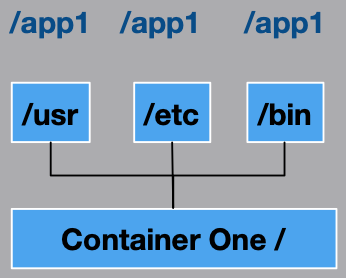
Containers are the virtualization of operating-system-level resources. For example, take the files in /usr, /etc, /bin and marry that with the application files and you essentially have a container.

This is a bit different from the way we traditionally virtualize. Most of our virtualization is hardware centric.  

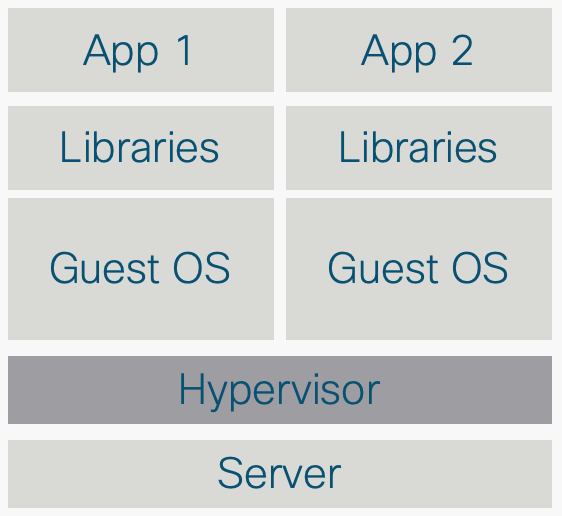
We take a piece of hardware then install a hypervisor and operating system. We install the application on that operating system and we call it a VM.

This traditional way comes with disadvantages. For one, VMs are heavy. VMs require a lot of resources; to move them around, to bring them back to life, and to create new ones. The application team and the development of their applications generally rely on the underlying infrastructure. So if the infrastructure wasn’t capable of supporting the application, it would result in delaying application updates.

VMs simply are not agile enough for todays application centric world.

Containers, however, support this agility. This application agility is often known as continuous integration and continuous development (CI/CD) workflow. Containers are light weight and independent of one another. Containers are easy to create and easy to destroy. Also, because they are independent of the underlying infrastructure and from the host filesystem, they are portable across clouds and OS distributions.

What does Kubernetes mean? K8s?
The name Kubernetes originates from Greek, meaning helmsman or pilot. K8s is an abbreviation derived by replacing the 8 letters “ubernete” with “8”.

What are some Kubernetes derivatives?

Mike


https://kubernetes.io/docs/concepts/overview/what-is-kubernetes/#what-s-next

https://kubernetes.io/blog/2015/04/borg-predecessor-to-kubernetes/

HyperFlex Edge


What is HyperFlex Edge? 

HyperFlex Edge is a 1U form factor of Cisco hyperconvered solution designed for the branch office. It offers all-flash storage and NVMe cache, support for containers on VMware and bare metal. HyperFlex Edge makes for an easy deployment of core services like DNS and DHCP at the branch or remote office.

Cisco HyperFlex HXAF-E-220M5SX Edge Node

What are some advantages of HyperFlex Edge? 

Simplicity of the HyperFlex solution cannot be overlooked. From rack to install of a 3-node cluster takes roughly two hours. 

The most interesting part of HyperFlex Edge is that the solution leverages your current branch infrastructure. It operates using existing top of rack switching at the branch office with single or dual uplink options.

Uplink options are currently 1GbE or 10GbE

Single Switch Configuration

Operation and Administration

HyperFlex Edge is deployed in a 2, 3, or 4-node cluster and configured with a replication factor of 2 (RF2). Simply put, a full node can fail and the cluster is still operational. It can scale up to 64 nodes in the current release.

Managing the infrastructure is done through Cisco Intersight where you can manage every HyperFlex cluster through one pane of glass. Intersight supports UCS blades and servers to allow for central management of your blade, server and hyperconverged infrastructure.

I hope that this has been helpful.

You can visit my previous post on Cisco HX to get an overview of Cisco’s HCI offering.

Mike