SD-WAN – Cisco Viptela

As I mentioned in my previous post, SD-WAN is an emerging market. Many vendors are trying to become the front runners not only to capitalize on the market trend but to help standardize and define SD-WAN.

Want to secure your SD-WAN? Check out SIG and Integrating it into SDWAN

Several vendors are offering SD-WAN. Cisco has two SD-WAN offerings, Viptela SD-WAN and Meraki SD-WAN. We will discuss the Viptela solution and provide an overview of the architecture as well as how you can transition to SD-WAN.

The network is no longer a function of hardware. The network is a function of software.

Let’s take a step into what makes SD-WAN, SD-WAN. Software Defined-Wide Are Network is nothing more than a router with less responsibilities.

Now you may be asking, what are the responsibilities of a standard router? Well, a standard router has to maintain a Control plane, right?..OSPF, BGP, the RIB. Of course the Data Plane and Management.

Taking the responsibilities of a standard router and segmenting them or decoupling them so that they don’t have dependencies on each other, is what makes SD-WAN at its foundation. After all this is software defined networking…

Viptela SD-WAN Overview

vBond – vBond is the orchestrator for control plane connectivity. When a new device comes onto the fabric it needs to contact vBond. vBond will assist in authenticating and connecting the device to the vSmart controllers and discovering vManage. vBond is a virtual appliance.

vSmart – vSmart is the controller. vSmart controllers distribute data plane policies to the vEdge routers. OMP is used to communicate between the vSmart controllers and the vEdge routers. vSmart controller is a virtual appliance.

vEdge – vEdge is the router and establishes a TLS connection to the vSmart controllers over OMP. vEdge routers connect to vSmart controllers and receives data plane and control plane policies. vEdge routers support traditional IGP protocols and VRRP for the LAN. vEdge routers can be deployed physically or virtually.

vMange – Is the GUI for all of this. This is where you create/assign policies, provision, monitor and troubleshoot your SD-WAN network. vManage is a virtual appliance.
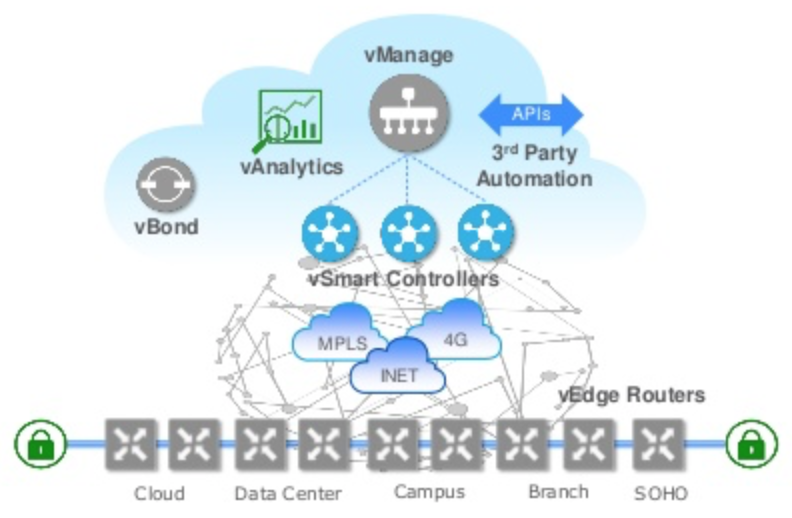
Screen Shot 2018-09-05 at 10.59.53 AM

I wanted to highlight these as foundational components of Viptela and by no means is it a complete architecture!

Let’s explore how to get from traditional WAN to a SD capable WAN. First, ask your self if you are faced with these issues.

  1. Poor user experience for cloud and Internet applications at branch
  2. Provide high-bandwidth connectivity at the branch and reduce WAN costs
  3. Simplify branch deployments
  4. Securing the branch

If you are affected by one or more of these issue then you should look into Cisco’s SD-WAN Viptela.

Then start with a phased approach. You can stand up Viptela in a brownfield deployment fashion so that when you are ready, you can cutover from your existing WAN to your SD-WAN.

Deploy vBond, vSmart, and vManage as a virtual appliance in the cloud.
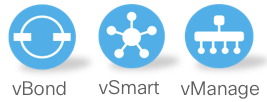
Screen Shot 2018-09-05 at 11.38.37 AM

Then decide on a physical or virtual deployment for your branch vEdge routers. If you are using ISR1K/4K, or ASR1K at the branch, you already have vEdge capabilities! IOS-XE release 16.9.1 will get you the the SD-WAN capabilities.

Viptela has some of the best and easy to digest documentation. See Getting Started and Viptela – Bring Up Sequence of Events to get your SD-WAN fix!

Mike

Evolving Technologies

SD-WAN, SD-Access, and Intent Based Networking are emerging designs to serve a single purpose.

Application trends, traffic trends and user experience are changing. They are going to continue to change as the adoption of the “cloud” continues.

The idea of hosted applications has changed the way the network functions and delivers content. Applications like Cisco WebEx, Microsoft O365, and Amazon Web services are all examples of applications that have adopted the cloud model. Also better known as Software as a Service (SaaS).

These applications, different in function yet attempt to benefit from heterogenous networks. Where any user, at any location, with any network can access their application.

Any user, any location, and any network is of course subjective and has dependencies unrelated to this discussion however this is the idea behind SD-WAN, SD-ACCESS, and Intent Based Networking.

The benefits that come from these designs are reduced operational expenses/capital and simplifying the network.

However, the true benefit that these designs offer is user experience. User experience is the business of the today and the future.

Through a series of posts we will talk about SD-WAN and other related “evolving technologies” and buzz around the industry.

Mike


CCIE journey update part 2

Wow. . . .

What. A. Day!

Just coming from my first attempt at the CCIE written. I passed! Unreal feeling!!

I’m not going to sit here and say that it was easy. It wasn’t, it was definitely challenging. I didn’t have the answers to what seemed like many of the questions.

It was such a odd feeling, I had an understanding of everything that was asked on the test, yet I didn’t have a surefire answer. It left me nervous for most of the test.

I had written down some reminders for myself on my white board before starting my test..

  • Trust your gut!
  • Read the question and answer thoroughly!
  • Take your time!
  • Process of elimination!
  • BGP well-known/optional/transitive attributes (for some reason I had this in my head and wanted to get rid of it so I wrote them down)

Now the above points, they may be obvious, but I needed a reminder. I wrote them down which oddly calmed me.

Q1..Submit..Q2..Submit..Q50..submit

I was zoned in baby!

Clock check ..64 minutes left..Okay, i’m making good time.

Q70..Submit..Q90..Sumbit..Oh, man hearts racing again, finish line is near!

“Are you sure you want to end your exam?”..ya I guess

Waiting..Waiting..Waiting..BAM!

“Congratulations!”

I’m not even going to lie, I did shed a tear. What a relief!

I walked out of the testing center yelling “LET’S GO!!!” “LET’S GO BABY!” “WOO!!”

I’ve put in a lot of work and the payoff seems so great. Yeah this is only the written and doesn’t actually mean anything but it most certainly does. It means that I’m following a process. The process is key to success. Forget about the overall goal. Put in the work, day in and day out. There is no choice, there are no excuses.

I will take a bit to enjoy this win, but not long!

Mike


Multicast BSR

Hello fellow networking savants. Hope you are all well, working towards your goals and certifications. For myself, I’ve been busy. A hungry busy if you will. Hungry for the next best thing.

Today I will be discussing Bootstrap router. Multicast is a weak spot for me so I thought it would be good to write about it.

Let’s get into it.

BSR is a standards based solution that shares RP information, it performs the same function as Auto-RP (Cisco proprietary) and uses the same concept of cRP or candidate RP.

There are two roles in BSR:

Candidate BSR – Similar function to the Mapping Agent (MA) in Auto-RP, shares information that it receives from all candidate RPs.

Candidate RP – The routers advertising themselves as a potential Rendezvous Point (RP).

Where BSR differs from Auto-RP is how it shares its information with other multicast routers in the network.

There can only be one active BSR in a multicast network and it’s election is based on highest priority, and if the priorities are the same among multiple BSRs the router with the highest IP address will be elected at the BSR.

BSR messages are sent to all routers on a hop-by-hop basis, sending its messages to the multicast address 224.0.0.13 with a TTL of 1. When a multicast router receives this message it resends this message out all PIM enabled interfaces.

All multicast routers will eventually know about the source address of the BSR through these messages. The messages also include group range-to-RP set mapping. (more on this later)

Candidate RPs will know the address of the BSR and will register its self via a unicast packet to the BSR.

Once the BSR receives the registration messages from the cRPs, it will include all cRPs in its BSR messages and share them to all multicast routers. This differs from Auto-RP, Auto-RP picks only the best RP for every group.

Let me show you what some of this theory looks like on the command line.

bsr8

Enable multicast routing on all routers and enable PIM sparse mode on all Ethernet segments for R4,R5,R8,R10

bsr

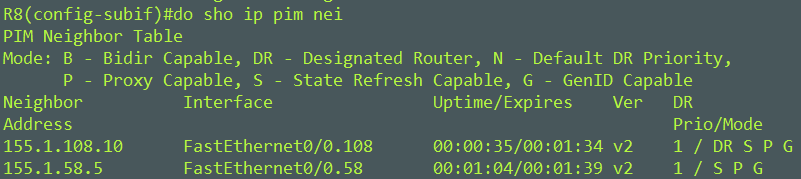
R8 has formed PIM neighbors with R5 and R10. All routers have their appropriate neighbors.

bsr1

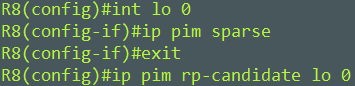
I’ll make R8 and R10 candidate RPs

bsr2

I’ll make R5 the BSR, but before I do that I am going to turn on debug ip pim bsr for R5,R8 and R10.

From R5s debug output, you can see that it received both R8s and R10s RP registration.

bsr3

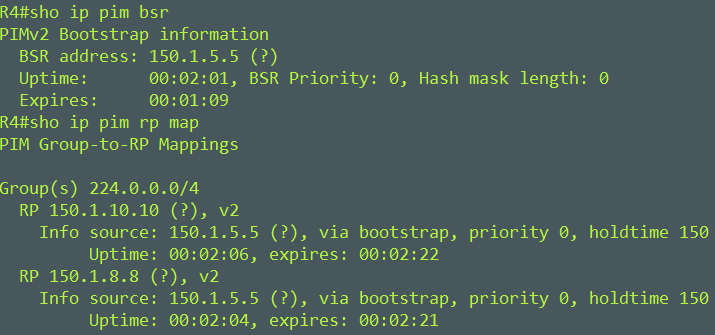
From R4s perspective, it knows about the BSR at R5 and the two RPs at R8 and R10.

bsr4

Notice that R4 is seeing both R8 and R10 as possible RPs for the 224.0.0.0/4 group. This is known as the group range-to-RP set mapping. This was included in the BSR messages that R5 generates.

We’ll have to check the rp-hash for the 224.0.0.0/4 group to know who is the RP.

bsr5

R10 is the RP for 224.0.0.0/4. How was this determined?

  1. If the RPs advertise for the same group (in our case) prefer the one with the lower priority. Default it 0.
  2. Look for the highest hash value if priorities are the same.
  3. Highest IP address will be preferred if priority and hash values are the same.

R10 won the election based on having the higher IP in this case.

The hash value is an interesting feature that allows us to load balance our groups between RPs.

The hash value is based on a 32-bit value. By default this hash value is 0. So this means the hash value will be calculated on the IP address of the RP.

Lets change the hash mask length to be 31 on R5 the BSR.

bsr6

Lets view R4 to see what this has changed.

bsr7

R4 now see R10 as the RP for the 239.1.1.1 group and R8 as the RP for the 239.1.1.2 group. Changing the hash mask value has allowed us to load balance our groups.

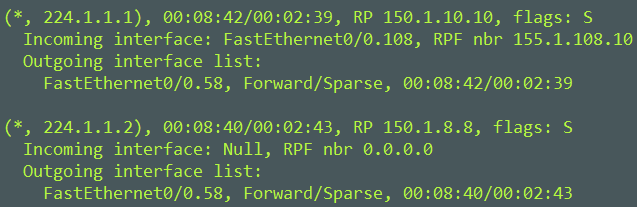
We can also confirm this from a data plane perspective. I’ll join R4 to two different groups.

bsr9.PNG

I joined R4 to group 224.1.1.1 and 224.1.1.2, notice the RPs for both (*,G) groups.

Mike

Summarizing Discontiguous Networks

There are a series of posts by INE, I believe the author is Brian McGahan (A very smart guy to say the least), that explains how to optimally create an ACL with discontiguous networks.

You can find the series of posts here

Binary Math Part1
Binary Math Part1 – Answers
Binary Math Part2
Binary Math Part2 – Answers

I apologies if I’ve given the credit to the wrong INE instructor, you guys are great!

I attempted to summarize the process that is so wonderfully explained in great detail in the above posts. The scenario is below. Just after the scenario is the summary. The answer to the scenario is left out.

Create an ACL to use as an access-class on the VTY ports.  Use as few lines as possible.  You must use two “deny” statements in your ACL.

The following hosts should be allowed to telnet into your router:

132.130.1.16
132.194.1.16
132.130.1.17
132.194.1.17
132.130.1.19
132.194.1.19
132.130.1.24
132.194.1.24
132.130.1.25
132.194.1.25
132.130.1.26
132.194.1.26
132.130.1.27
132.194.1.27
124.130.1.16
124.194.1.16
124.130.1.17
124.194.1.17
124.130.1.19
124.194.1.19
124.130.1.24
124.194.1.24
124.130.1.25
124.194.1.25
124.130.1.26
124.194.1.26
124.130.1.27
124.194.1.27

Summarizing discontiguous networks

Mike


Forwarding Equivalent Class

Forwarding Equivalent Class or FEC is a new term to me. It is a fancy term to describe the mapping between MPLS labels and IPv4 or IPv6 prefixes and is fundamental to understanding MPLS.

I first learned MPLS some years ago and this is the first time that I have come across this vocabulary. I guess i’ll start using it to sound super smart in my next bar conversation on MPLS…right

In any case, after enabling MPLS Label Distribution Protocol (LDP) and a LDP peer session is established to a neighbor, labels will begin to be associated to destination prefixes. Routers will use the MPLS LFIB instead of the IP routing table to “switch” traffic.

Label Distribution can be done in three ways

  • Label Distribution Protocol (LDP) – advertises labels for IGP learned routes
  • MP-BGP – Advertises labels for BGP learned routes
  • RSVP – Used for MPLS Traffic Engineering (MPLS TE)

It’s important to remember that LDP, MP-BGP, RSVP perform label distribution or in other words impose labels onto routes. They have advantages in their distribution of labels which is why there is more than one option but something to keep in mind when talking about Label Distribution.

So the term itself isn’t actually all that necessary to remember, which is in difference with in my opening comments but thought it was interesting vocabulary.

Mike