Cisco Cyber Ops Scholarship

Back in July, Cisco started a scholarship campaign for their new certification track CCNA Cyber Ops. A 10-million dollar investment would be made to increase the talent pool with critical cybersecurity proficiency.

“Through the scholarship program, Cisco will offer free training, mentoring, and testing designed to help you earn CCNA Cyber Ops certification and hone the skills needed for the job role of security operations center analyst. The new CCNA Cyber Ops certification has been designed to address the critical skills deficit, providing the job-ready knowledge needed to meet current and future challenges in network security.” -Cisco

https://mkto.cisco.com/security-scholarship

The qualification for the scholarship were minimal, (you can find them at the above link) so I decided to apply. After months of no communications and one assessment test, I finally received this….

congrats

Sweet!

Congratulations to anyone that also got accepted. I’m excited to see where this takes me.

Embedded Flash Write Error on N7K

I came across a unique issue the other day while attempting to save my changes to startup-config on a N7004. Never having seen this issue in the wild before, it was great exposure and one that I enjoyed. Here are my findings.

Each Nexus 7000 Supervisor 2/2E is equipped with two onboard embedded identical eUSB flash devise in a RAID1 configuration. Over years of in service, one of these devices may get disconnected from the USB bus. This causes the RAID software to drop the affected device to be removed from its configuration. System still can function normally with the remaining working device.

However, if the second flash device also experiences similar issue and drops out of the RAID array, boot flash devices will be re-mounted as read-only preventing configuration copying.


N7k# wr
[########################################] 100%
Configuration update aborted: request was aborted

So apparently I cannot save my configurations. Why? (No, write mem or wr is not supported in NX-OS, but I’m lazy and created an alias for it)

Executing the ‘show module’ command, I can see that my supervisor isn’t so happy.
N7k# show module

Mod  Ports  Module-Type                         Model              Status

—  —–  ———————————– —————— ———-

2    0      Supervisor module-2                 N7K-SUP2           active *
3    24     10 Gbps Ethernet Module             N7K-M224XP-23L     ok
4    48     10/100/1000 Mbps Ethernet XL Module N7K-M148GT-11L     ok

Mod  Online Diag Status

—  ——————

2    Fail
3    Pass
4    Pass

Let’s dig a bit deeper to see what the failure is related to.

I know that my supervisor is in module number 2. So with the command ‘show module internal exceptionlog module 2’ I can view diagnostic information about module 2.

N7k# show module internal exceptionlog module 2

********* Exception info for module 2 ********

exception information — exception instance 1 —-
Module Slot Number: 2
Device Id         : 0
Device Name       : undef
Device Errorcode  : 0x00000000
Device ID         : 00 (0x00)
Device Instance   : 00 (0x00)
Dev Type (HW/SW)  : 00 (0x00)
ErrNum (devInfo)  : 00 (0x00)
System Errorcode  : 0x418b001e The compact flash power test failed
Error Type        : Warning
PhyPortLayer      : 0x0
Port(s) Affected  : none
Error Description : Compact Flash test failed
DSAP              : 0 (0x0)
UUID              : 483 (0x1e3)
Time              : Wed Oct 19 21:32:20 2016
(Ticks: 58081EA4 jiffies)

This is interesting.. The flash card on the supervisor is clearly having an issue.

To check the status of the RAID, enter the show system internal file /proc/mdstat command. If the system has a standby supervisor, attach to it first and run the command as well. I will be executing this on a single sup N7004.

N7k# show system internal file /proc/mdstat
Personalities : [raid1]
md6 : active raid1 sdc6[2](F) sdb6[1]
77888 blocks [2/1] [_U]

md5 : active raid1 sdc5[2](F) sdb5[1]
78400 blocks [2/1] [_U]

md4 : active raid1 sdc4[2](F) sdb4[1]
39424 blocks [2/1] [_U]

md3 : active raid1 sdc3[2](F) sdb3[1]
1802240 blocks [2/1] [_U]

unused devices: <none>

In the previous output there are four partitions, md3 through md6, mounted to stored boot images and other persistent configuration data. For each disk partition, a status [2/2] indicates that there are two disks configured and two currently run. [UU] indicates the current status of each disk and identifies the status as “U”p and running.

Any status other than [2/2] [UU] might indicate a degraded RAID array where the status for any failed disk will be displayed as “_”.  For example, the status shown such as “[2/1] [_U]” or “[2/1] [U_]” indicates a degraded RAID array configuration.

It is recommended to recover the offline disks and get them added back into a RAID array as soon as possible.

N7k# show system internal raid | grep -A 1 “Current RAID status info”

Current RAID status info:
RAID data from CMOS = 0xa5 0xc3

The last number in the RAID data indicates the number of disks failed.

0xf0 ==>> No failures reported
0xe1 ==>> Primary flash failed
0xd2 ==>> Mirror flash failed
0xc3 ==>> Both primary and mirror failed

Both flash devices have failed on this device in my case.

So the Cisco Field Notice: FN – 63975 defines and resolves this issue. The field notice associates the issue with a documented bug (CSCus22805). I was able to resolve this issue assisted by the FN and the documented bug. If you have a CCO account you can download the Flash Recovery Tool noted in the FN to resolve this issue. There is also a really well written readme file included with the Flash Recovery Tool download.
Here is the readme file if you are interested. flash_recovery_tool_readme


Mike


FEX Migration

I have been working extensively in the Data Center lately. I have a lot of respect and love for the Cisco Data Center technologies. In fact prior to just a couple of years ago, I had only worked on Catalyst systems. Unaware of the ISP/Carrier grade type of equipment that Cisco had to offer. After realizing this, I had a great desire to have a working knowledge and understanding of this technology. So our discussion today begins with FEX migrations with Cisco Nexus 2000 Series Fabric Extenders. This discussion is assumed you have some understanding of NX-OS.

Fabric Extenders in their simplest form are extensions to the Nexus 5K Series. They provide the 5Ks with greater port density. They are kind of like line cards for 6500s…

There are three different implementations for FEXs that you can choose from for your Data Center Design.

  1. Strait-through using static pinning: FEX is connected to a single Cisco Nexus switch. The single switch exclusively manages the ports on the FEX. Static pinning means that each downlink server port on the FEX is statically pinned to one of the uplinks between the FEX and the switch. Always uses same uplink. N5K
  2. Strait-through using dynamic pinning: FEX is connected to a single Cisco Nexus switch. The port between the FEX and the switch are bundled into a port channel and traffic is distributed across the uplinks that are based on the PortChannel hashing mechanism. N7K/N5K
  3. Active-active FEX using vPC: FEX is dual-homed to two Cisco Nexus Switches. vPC is used on the link between the FEX and the pair of switches. Traffic is forwarded between the FEX and the switches that are based on the vPC forwarding mechanisms. N5K

There are also several Cisco Nexus 2000 Series Fabric Extenders to choose from based on your design needs. Below are your choices.

  • Cisco Nexus 2148T GE Fabric Extender: Provides 48 fixed ports of Gigabit Ethernet interfaces for server connectivity and up to four 10 Gigabit Ethernet uplink interfaces in a compact one rack unit (1RU) form-factor
  • Cisco Nexus 2248TP 1GE Fabric Extender: Provides 48 Fast Ethernet and Gigabit Ethernet (100/1000BASE-T) server ports and four 10 Gigabit Ethernet uplink ports in a compact 1RU form factor
  • Cisco Nexus 2224TP 1GE Fabric Extender: Provides 24 Fast Ethernet and Gigabit Ethernet (100/1000BASE-T) server ports and two 10 Gigabit Ethernet uplink ports in a compact 1RU form factor
  • Cisco Nexus 2232PP 10GE Fabric Extender: Provides 32 Gigabit Ethernet and 10 Gigabit Ethernet (IEEE Data Center Bridging [DCB] and Fibre Channel over Ethernet [FCoE] capable) Enhanced Small Form-Factor Pluggable (SFP+) server ports and eight 10 Gigabit Ethernet (IEEE DCB and FCoE capable) SFP+ uplink ports in a compact 1RU form factor

You’ll want to be familiar with the features each model provides. For our discussion today we will be configuring a Cisco Nexus 2148T GE Fabric Extender. Our configuration that proceeds will be the same for any model of FEX however.

In this scenario I will be migrating two 2148T FEXs from their parent Nexus 5010s to a new Nexus 5548 parent device. The FEX is not connected to the 5548s at this point.

Provision the FEX for the 5548s

Execute the following commands to provision FEX number 101

N5548# config t
N5548(config)# slot 101 (This should resemble the number of your fex)
N5548(config-slot)# provision model N2K-CC248T (This should resemble the fex model number)
N5548(config-slot)# exit

Create a port-channel that will be used for Strait-through using dynamic pinning.

N5548(config)# int po1
N5548(config-if)# description FEX 101
N5548(config-if)# switchport mode fex-fabric
N5548(config-if)# fex associate 101

Configure FEX enabled interfaces and assign them to po1

N5548(config)#int eth1/5-6
N5548(config-if-range)# description FEX 101 E1/5
N5548(config-if-range)# switchport mode fex-fabric
N5548(config-if-range)# fex associate 101
N5548(config-if-range)# channel-group 1

At this point, the 5548s are aware of a provisioned FEX, I can start staging my FEX interface configurations. By doing this I am minimizing my down time of the when I perform my cut over for the hosts that are utilizing the FEX.

Show run will provide you with the interfaces of the FEX

CORE-N5548-PROD# sho run

interface Ethernet101/1/1
interface Ethernet101/1/2

Show fex 101 will not be recognized until the FEX is physically attached to the 5548s.

N5548# sho fex 101
FEX 101 not found

N5548(config)# int eth101/1/1
N5548(config-if)# switchport access vlan 14
N5548(config-if)# spanning-tree port type edge
N5548(config-if)# vpc orphan-port suspend
N5548(config-if)# channel-group 101 mode active

N5548(config)# int po101
N5548(config-if)# switchport mode access
N5548(config-if)# vpc 101

My configurations are complete, I will do the same for the second FEX. I can take the FEX uplinks from the 5010s and move them to the 5548s. The FEX will undergo a firmware update if you are moving to a new NX-OS version on the 5548. It will take roughly 8 minutes to update firmware.

Here is the output before migrating FEX 101, when connected to the 5010s

N5010# show fex 101 d

FEX: 101 Description: FEX101   state: Online
FEX version: 5.2(1)N1(3) [Switch version: 5.2(1)N1(3)]
FEX Interim version: 5.2(1)N1(3)
Switch Interim version: 5.2(1)N1(3)

Here is the output after migrating FEX 101, when connected to the 5548s

N5548# sho fex 101 detail

FEX: 101 Description: FEX0101   state: Online
FEX version: 7.0(6)N1(1) [Switch version: 7.0(6)N1(1)]
FEX Interim version: 7.0(6)N1(1)
Switch Interim version: 7.0(6)N1(1)
Extender Serial:
Extender Model: N2K-C2248TP-1GE,  Part No:
Card Id: 99, Mac Addr: 88:75:56:bf:60:42, Num Macs: 64
Module Sw Gen: 21  [Switch Sw Gen: 21]
post level: complete
Pinning-mode: static    Max-links: 1
Fabric port for control traffic: Eth1/5
FCoE Admin: false
FCoE Oper: true
FCoE FEX AA Configured: false
Fabric interface state:
    Po1 – Interface Up. State: Active
Eth1/5 – Interface Down. State: Configured
Eth1/6 – Interface Down. State: Configured
Fex Port        State  Fabric Port
Logs:
11/02/2016 06:01:08.356480: Module register received
11/02/2016 06:01:08.357148: Image Version Mismatch
11/02/2016 06:01:08.357378: Registration response sent
11/02/2016 06:01:08.357560: Requesting satellite to download image
11/02/2016 06:07:13.672162: Image preload successful.
11/02/2016 06:07:14.787994: Deleting route to FEX
11/02/2016 06:07:14.802396: Module disconnected
11/02/2016 06:07:14.803518: Module Offline
11/02/2016 06:07:14.813590: Deleting route to FEX
11/02/2016 06:07:14.821427: Module disconnected
11/02/2016 06:07:14.845981: Offlining Module
11/02/2016 06:08:33.670509: Module register received
11/02/2016 06:08:33.671684: Registration response sent
11/02/2016 06:08:33.708916: create module inserted event.
11/02/2016 06:08:33.709560: Module Online Sequence
11/02/2016 06:08:39.951042: Module Online


Once the FEX completes it’s  firmware upgrade it will bring the provisioned interfaces online. At this point the migration is complete and the downstream hosts connected to the FEX should have network connectivity. You will want to repeat this process for each FEX. Be sure to configure the appropriate information like interfaces, fex number, and port channels.

Mike


Bringing wireless to the Cloud

It’s been a bit busy as of late. The holiday seasons are just around the corner, and wireless is in the cloud.

The word “Cloud” is such a hot word right now. Everything these days is starting to move to the ‘cloud’.  Most vendor marketing folks end with something along the lines of “..AND rest assure, your data will be in the “Cloud”…Then everyone soils at the thought of their data being in the cloud with; with no inclination, no questions on how their data will get there, the security of their data, or, or if their current infrastructure can support it! GAH!

In any case, yes wireless is now being offered in the Cloud, and at the for front of this is Meraki. Meraki was founded in 2006 by MIT students and was acquired by Cisco in 2012. Since then they have been offering wireless hardware and services to mainly enterprise entities. They provide a suit of hardware and services ranging from APs, switches, firewalls, phones and more.  I find their hardware to be modern, it kind of reminds me of Apple; sleek, minimalist design and easy to install. They have an intuitive management dashboard that provides administration and configuration of your devices. You can even leverage the analytical data captured by APs for targeted advertisement to your customers.

meraki

Want to learn more about Meraki? Want a free AP? For a short time, Meraki is giving away a free AP if you attend one of their hosted webinars. If you’re lucky, you may even get a switch! Here’s the link https://meraki.cisco.com/freeap

Mike

Cisco WLC 8510 MIC bug

Welcome one, welcome all to the second blog. Today’s discussion will be on a bug that was found in a recent software upgrade to a  8510 wireless controller. Let’s begin.


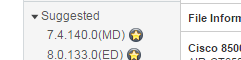
If you are one to stay on the straight and narrow when it comes to downloading and installing Cisco software, then I applaud you. We have something in common. By the “straight and narrow” I mean, sticking to ‘Star’d’ releases. You know, the ones with the star just to the right of the software version? The Cisco’s “suggested release” based on software quality, stability and whatever else they deem star worthy. And the ones who are daring to test the waters of the non-star’d software versions. Eh, I guess I like you too.

starded

It’s like dealing with the Salton sea when it comes to Cisco software releases. I mean come on! Feed the sea to much water and you begin to waste water. Feed the sea too little water, and the sea begins to evaporate leaving toxic sand behind. Before you know it, you’ve got asthma and not enough water to take a shower! Anyways I digress. It’s a double edge sword to say the least.

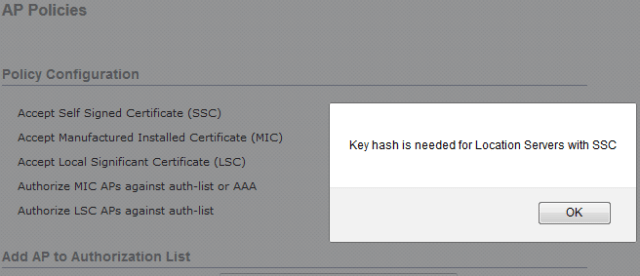
We have been using manufacturer installed certificate (MIC) for some time now. Basically just to contain unauthorized Cisco APs from joining our controllers. And up until now we have been utilizing the web interface to add the mac address of the AP to our AP policies. This changed after upgrading our controller to software version 8.0.133. After the upgrade, you can’t add mac address via the web interface. You get this nice little message.

ssc

SSC isn’t checked! So what’s your issue man!

Through Cisco’s bug search tool this little guy came up.

bug

The workaround was valid. It worked just fine through the cli.

In all, It really isn’t that big of a deal. It was something that I felt interesting enough to post about. The bug number is in the screen shot, but here it is if you missed it. CSCuz60224

Mike

Cisco Universal AP

An interesting find at one of my customers sites this week…

Cisco has a universal AP product line that address the worldwide regulatory compliance requirements for APs. It allows an administrator to dynamically set the regulatory domain in which the AP will be operating. Regulatory domains define operational standards like available channels, power levels, etc.

This differs from the Cisco Aironet Access Point models which have a fixed regulatory domain. Meaning they are most likely purchase and shipped within your country and come preconfigured to operate and comply with your countries regulatory domain.

Cisco’s Universal APs require priming the AP with the regulatory domain and country for proper use.  This process is actually really easy and kinda fun if you have never done it before. It does require a smartphone with WiFi and GPS capabilities however and Cisco’s AirProvision app.

In my customers case, all of their AIR-AP2702I-UXK9 APs were deployed without being primed. I recognized there was an issue when the APs LED lights were cycling between Red-Green-Off. Jumping into the controller under the ‘Advanced’ tab of the APs I was able to confirm that the Country Code was ‘UX’ and Universal Prime Status was ‘Unprimed’.

Now this find was by complete coincidence because I was on site for a completely difference issue. The customer thought the LED lights were normal and the customer was using the wireless so they didn’t see an issue. The problem went unknown because of this. But, by default an unprimed AP will broadcast its SSIDs only on the 2.4 GHz band, at a lower power level that is acceptable in all regulatory domains and will completely ignore the 5 GHz band until the AP is primed. So your AP is quite trash at this point.

In any case, through the use of the Cisco link below, I was able to prime all of my customers APs by manually priming one of them then turning CDP on it’s radios and CDP on the neighboring APs radios. Through the use of  NDP messages sourced from the manually primed AP, it was able to propagate it’s regulatory domain to it’s neighboring APs.

After you are done you can view the primed status of your APs. The first manually primed AP status will look like this.

The neighboring APs primed status will look like this.

ndp_primed

http://www.cisco.com/c/en/us/td/docs/wireless/access_point/ux-ap/guide/uxap-mobapp-g.html

Mike